PNG vs WebP: which format should you choose?
The short answer: WebP for anything you publish, PNG for anything you are still working on or handing to someone else. The longer answer is more interesting, because the two formats overlap in a way PNG and JPG never did — WebP can do everything PNG does, and one thing it cannot.
The two formats side by side
| PNG | WebP | |
|---|---|---|
| Compression | Lossless only | Lossless or lossy |
| Transparency | Full alpha channel | Full alpha channel, in both modes |
| Typical size | Baseline | Smaller lossless; much smaller in lossy mode |
| Animation | No (APNG is a separate variant) | Yes |
| Tooling support | Universal, including very old software | All current browsers; patchier in older desktop apps |
Why PNG files get so large
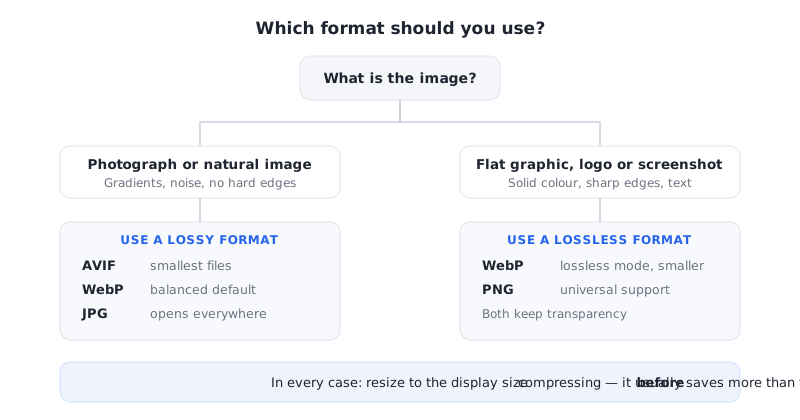
PNG is lossless: every pixel that goes in comes back out unchanged. That is exactly what you want for a screenshot with sharp text, a logo, or an illustration with clean flat colour, and PNG's compression is genuinely good at those — long runs of identical pixels collapse to almost nothing.
The problem starts with photographs. A photo has essentially no repeating runs; every pixel differs slightly from its neighbour because of sensor noise and natural gradients. Lossless compression has nothing to exploit, so a photograph saved as PNG can easily be five to ten times larger than the same image as a decent-quality JPG or WebP. If you are storing photos as PNG, that alone is likely your single biggest saving.
Where WebP wins
WebP has two modes, and this is the part people often miss. Its lossless mode is a direct PNG replacement — same pixel-perfect result, usually a smaller file. Its lossy mode works like JPG but keeps the alpha channel, which is something JPG has never been able to do. That combination is why a transparent product image can go from a heavy PNG to a small WebP with no visible change.
For a website, the practical effect is on page weight and therefore on load time. If the image concerned is the largest one on screen, it is also the element measured as Largest Contentful Paint, so the saving shows up directly in your Core Web Vitals.
When to keep PNG anyway
Keep PNG while a file is still a working master you will re-edit, since every lossy save compounds the previous one. Keep it when the recipient's software is out of your control — a print shop, a client on older desktop tools, a system that only accepts a fixed list of formats. And keep it when the image must be reproduced exactly, as with a screenshot used as evidence or documentation.
Everywhere else — the version that actually ships to a browser — WebP is the better default. If you want to push further still, AVIF compresses harder again, at the cost of slower encoding and slightly narrower tooling support.